What Is CompTIA A+? The Ultimate Guide (2026)
By Sameer Khan. Welcome to my guide on CompTIA A+ Certification. As the founder of TechPathHub, I create easy-to-understand guides for IT beginners. I am still learning myself, so I am by no means a veteran. I cross-reference all exam-related information with official vendor sites. Everything I do is based on my own home lab.
Last Checked: 14th November 2026.
CompTIA A+ is a fundamental certification provided by CompTIA. This is a non-profit trade organisation that provides many certifications for the technology industry. It proves that you have knowledge and skills in common IT support tasks. This includes installing hardware, installing an Operating System, connecting devices to a network, troubleshooting common issues, and identifying basic security issues. You will learn a large amount about how technicians troubleshoot issues with a computer not turning on.
You will need to pass both Core 1 (220-1201) and Core 2 (220-1202).
What Makes It Different
Many certifications are brand-specific. For example, Microsoft certifications are specifically for Microsoft products, and AWS certifications are for Amazon’s cloud. CompTIA A+ is not brand-specific. This means you can use the same troubleshooting techniques on a Dell laptop, Lenovo desktop, and Android phone.
It also teaches you a systematic approach to troubleshooting.
This can help you in an office environment. For example, one person is unable to print from their Windows device, and another is unable to connect to their Wi-Fi on their phone. Although they are using different tools, you can use the same troubleshooting techniques. This won’t prove you have years of experience but will prove to an employer that you have done some research.
Who Should Take It
This is perfect for students, fresh graduates, people wanting to change careers, and anyone with an interest in computers. Whilst it is not required that you work within IT, it is recommended that you have around 9-12 months of hands-on experience.
This is a great certification to take if you are looking to go into a help desk or desktop support role. This involves answering questions, installing software, setting up devices, and helping with general computer issues.
Whilst there is a lot of information to learn, this is completely normal. Ask yourself a simple question before spending any money on a voucher. Do you enjoy troubleshooting why something has gone wrong and helping someone? If you answer yes, then CompTIA A+ is a good choice for you.
My Experience Creating a Home Lab for CompTIA A+
When I first looked at the CompTIA A+ Core 1 objectives,s I found the networking section overwhelming. I couldn’t get my head around the IP addresses and subnet masks in the books. I decided to create a simple home lab using VirtualBox. I aimed to install a virtual version of Windows 10.
I downloaded the ISO file for Windows 10 and created a new virtual machine in VirtualBox. I allocated 4GB of RAM and 50GB of virtual storage. I started installing Windows; however, when I opened up my web browser,r I had no internet.
This is a very common mistake for beginners, and I learned a lot from it. I spent around 30 minutes looking through forums and realised it was to do with the Network Adapter. VirtualBox by default uses NAT A, T, which means the VM can connect to the internet, but it is difficult for other devices to connect to it. I changed it to Bridged Adapter and restarted my VM. I now had a working network.
This helped me understand how hardware virtualisation works. gained hands-on experience with basic network troubleshooting and realised that within IT, T everything is problem-solving. This is what the CompTIA A+ exam tests.
Understanding The Two Exams
You will need to pass both of the exams. Both exams will be from the same series. They can be booked separately, and you can do them in any order. If you are confident with hardware, start with Core 1. If you are confident with operating systems,s start with Core 2.
The exams are actually quite similar. For example, if a user is unable to connect to the internet on their laptop, Core 1 will help you troubleshoot the wireless hardware and network. Core 2 will help you look at the settings, software, and security restrictions. If you don’t pass both exams,s
You won’t pass.
Core 1 (220-1201)
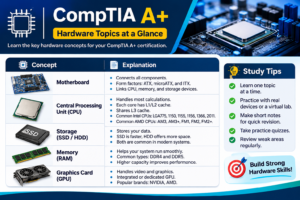
This exam focuses on the hardware side of IT. You will learn about processors, memory, storage drives, motherboards, power supply, laptops, printers, cables, and wireless. You will also learn the basics of how devices can communicate across a network.
Networking is an important part of this exam. Most workplaces will have connected devices. You may have a user who can’t connect to Wi-Fi, or your printer can’t connect to the other computers. This exam will also help you learn about virtualisation, cloud computing, ng and hardware/network troubleshooting. The best way to break this down is by looking at the official objectives.
Core 2 (220-1202)
This exam focuses on operating systems, security, software, and processes. You will be working with Windows, system utilities, and common software issues.
Security is a huge part of this exam. You will learn about malware, authentication, user permissions, access control, and why companies have security policies. Processes may seem like a small part of the exam, but it is an important part. This includes documentation, safety, communication, and professionalism. To provide great support, you need to have great communication skills. You will also need to document what you have done. This means the next technician won’t have to start from scratch.
Exam Information
There will be a maximum of 90 questions. You will have multiple-choice and performance-based questions (PBQ). Performance-based questions are mini simulations. You may be asked to order your troubleshooting steps or choose the correct configuration on the simulated screen.
Core 1 Core 2
Exam Code 220-1201 220-1202
Maximum Questions: 90 90
Duration: 90 mins 90 mins
Pass Mark: 675/9,00 700/900
Question Type Multiple Choice & Performance Based Multiple Choice & Performance Based
Main Topi:cs Hardware & Network,ing Operating Systems & Security
The scoring is between 100 and 900-900. This is not a percentage. You don’t need to aim for a certain score. Just learn the objectives.
Practice both question types. Some questions will need to be memorised, but performance-based questions will not. Try to understand why you are doing the troubleshooting steps.
Why Check the Current Version of The Exam?
CompTIA updates its exams every couple of years. This means any old books, videos, or practice exams may have topics that are no longer relevant. Check the exam codes on anything you buy.
Currently,y the English exams are 220-1201 & 220-1202 (V15 series). These were released on the 25th of March 2025. The old exams (220-1101 & 220-1102) were retired on the 25th September 2025.
Whilst the old materials may help with the basics, they may not include the new objectives. Some training companies estimate that the current exams will be retired around September 2028. This is just an estimate. Always check the CompTIA page to see what the current rules are. The certificate will not show which version you have passed.
How Much Does It Cost?
The cost of CompTIA A+ will depend on your country, voucher type, pe and study materials. In the US, one exam has been listed as costing around $265-$275. As you need to pass the exams
You should expect to pay around $530-$550. This does not include any books, practice, exams, or retakes. Sometimes you can find discounted vouchers from authorised sellers. The terms will vary depending on your region.
Cost
One Exam Voucher: Voucher around $265-$275
Two Vouchers: Around $530-$550
Study Materials Varies
Practice Exams Varies
Retake Extra (Unless included in package)
This is an example of the cost in USD. If you are not in the US, make sure the voucher is applicable in your region. Check what currency they accept and if there are any bank charges or taxes. Packages including a retake will cost more, so compare with a standard voucher.
You can keep your costs low by using free resources. The official objectives will help you. You don’t need to buy every book and course. Identify what areas you are struggling with and decide if buying a book, practice exam,m or class will help. Always check the CompTIA Store and Pearson VUE (the company providing the exams).
What Jobs Can You Get with CompTIA A+?
CompTIA A+ is commonly associated with entry-level support roles. Common roles include:
Help Desk Technician – Answer technical questions, help with password resets and app issues.
Desktop Support Technician – Install software, set up devices, and investigate system issues.
Field Service Technician – Go to different locations and install, check,k or fix equipment.
Your responsibilities will depend on the employer and job description.
Having a certification can help improve your resume. Especially if you don’t have much work experience. However, passing this certification doesn’t guarantee you a job. Employers will look at your communication, ability, education, and previous experience.
You can help yourself by creating some small projects. Documenting how you installed an operating system, set up a virtual machine,ine or investigated a network issue will give the interviewer something to talk about.
Is It Worth It for Beginners?
This can be a great option if you want to get into IT support. Having to study for two exams will help you learn about hardware and software. The official objectives will give you a clear idea of what you need to learn. Mentioning that you have passed CompTIA A+ on your resume can help match job descriptions that mention it as a preferred or required skill.
However, there are some downsides. It can be expensive to pass both exams. Especially if you have to retake one. It can take a long time to prepare. You will also have to renew every 3 years. If you already have good support experience, then a lot of the content will be repetitive. If you want to go straight into cloud or cybersecurity,y then a more specific certification may be better.
Decide what you know, where you want to go, and what you can afford.
How To Prepare
Breaking the syllabus down into smaller chunks will make it easier to prepare. It can become confusing if you try to learn everything in one go. Start by looking at the official objectives. Tick off what you know and create a study plan including reading, videos, practice questions, and hands-on work.
You don’t need an expensive lab. Using your own computer will help you understand how to set up system settings, hardware information, and basic network tools. Create a list of any questions you got wrong and regularly go over them. If you are struggling with storage or wireless, then spend more time on these areas. Try to explain the concept in your own words.
Download The Official Objectives
Start by downloading the official objectives for Core 1 and Core 2. This will tell you exactly what the exams will cover. It will also help you see if any books/courses are up to date. Save the documents somewhere easy to access.
Use this as a checklist. If you can recognise the term but not explain it, then leave it unticked. Knowing what RAM stands for is not enough. You should know what it does, how it is different to storage, and what happens when the computer runs out of RAM. This will tell you a lot more than how many videos you have watched.
Break the exams down into weekly goals. Test yourself on the topics. Keep your notes simple. Focus on key definitions, common issues, and what you did to solve them.
Use Free Training
You don’t need to pay for a full course. Professor Messer provides free video training for the A+ exams. Make sure they are up to date with the current codes (220-1201 & 220-1202).
Watch a lesson and take some quick notes. Pause when you reach a term you don’t know. Look it up or have a go. If you are learning about storage,e then compare SSD and HDD. If you are learning about networks, then look at how your computer connects to your router.
Pick one main course to complete. Although it may seem like you are being productive by using multiple courses,s it usually isn’t helpful. Only add extra material if you need a different explanation. Check when any books/practice exams were published,d as some are still based on the old exams.
Create A Home Lab
Practicing will help you understand the theory. A home lab is a safe place to try things out. You don’t need any servers.
A good place to start is using a virtual machine. This will allow you to run another operating system on your own computer. Practice installing an operating system, changing settings, gs and looking at system tools. Firstly, learn how to allocate a reasonable amount of memory and storage. Make sure your computer can run it smoothly.
You can also practice on your current device. Look at your IP address, network, and try some basic diagnostic commands. Open up Device Manager on Windows to see how your hardware looks.
Write down what you wanted to do, what you did, and what you learnt. This will help whilst studying and give you some great stories for your interview.
My Experience Building a Home Lab
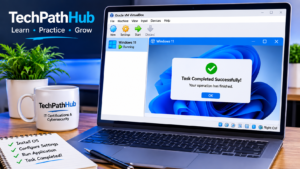
After looking through the objectives for CompTIA A+ Core 1, the networking section felt like a lot to take in. I decided toset upp a simple home lab using VirtualBox so that I could create a virtual version of Windows 10.
I downloaded the ISO file and created a new virtual machine within VirtualBox. I allocated 4 GB of RAM a50 GB0gb of storage. When attempting to open a web bro,wser I couldn’t get any internet.
This is quite a classic mistake. I read through several forums and worked out after about 30 minutes what my issue was. I had not changed the Network Adapter settings. This was still set to NAT by default. This allows the VM to connect to the internet but makes it hard to connect other devices. I changed this to Bridged Adapter and rebooted the VM. I suddenly had a working connection.
This little experiment has helped me understand how hardware virtualisation works and given me some practical experience with basic networking troubleshooting. I have also learnt that problem solving is everything in the IT industry,ustry and this is definitely what the CompTIA A+ exam is testing.
Create A Study Plan
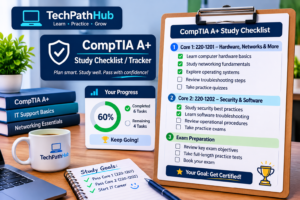
Creating a study plan will help you not feel overwhelmed by having to complete two exams. Decide how many hours per week you can realistically dedicate. Make sure it fits with your classwork, work,k and life. Create a consistent plan.
A simple way to do this is to split it into 4 sections. Learn the key concepts and terminology. Practice the relevant hands-on. Practice questions. Timed practice exams.
Keep your Core 1 and Core 2 notes separate so you can see what you have completed. A simple spreadsheet works well. Include the topic, date studied, score in practice, and what you need to work on. Review each week.
Don’t book the exam until you can explain the key concepts and solve common practical issues. Don’t rely on your notes.
Common Mistakes
Most beginners will waste time/money on:
Old study materials. If you are using the old objectives (220-1101 & 220-1102, then you may miss out on some topics in the current V15 exams. Always check the exam code.
Relying on memorising. Knowing the definitions will help you recognise the terminology, but the practical questions will require you to understand. If you are learning about IP addresses,s then also learn why networks need an IP address. Try to explain the concepts without using your notes. You will quickly realise what you actually know.
Ignore performance-based questions. These are testing your ability to use your knowledge. Practice doing real tasks and understand why you are doing each step.
A few other things to avoid:
Buying a voucher without checking any regional restrictions and expiry dates.
Ignoring the official objectives when choosing study materials.
Booking the exam without practicing.
Focusing on topics you know and ignoring the harder topics.
Using exam dumps. This GOES against the rules of CompTIA exams and puts your certification at risk. You will need skills for an IT role. Stick to using proper study guides, official objectives, and practice questions.
Conclusion
CompTIA A+ is a great starting point if you want to go into IT. It covers the hardware, networking, operating systems, security, and troubleshooting skills required for entry-level support roles. You will need to pass Core 1 (220-1201) and Core 2 (220-1202). Both exams will test your knowledge and application.
Download the current objectives and make sure your study materials are up to date with the V15 series. Use free resources, practice on your own computer, and create a study plan. Check what the current voucher prices are and any regional restrictions.
If you want to go into a help desk, desktop support,t or field service role, le this can give you a good foundation. Combined with hands-on practice and good communication, your applications will look much better.
FAQ
Is CompTIA A+ Difficult for Beginners?
This is an entry level certification, but there is a lot to learn. You may find learning the hardware terminology, networking,g and troubleshooting steps difficult. However, regular study, free videos, andhands-on practice will make a big difference. Focus on understanding how things work rather than memorising answers. You don’t need any work experience to sign up.
Do I Need to Do Core 1 & Core 2 On the Same Day?
No. They are separate exams. You can book them on different days in any order. Just make sure they are from the same series. At the moment, they would be 220-1201 & 220-1202.
Does CompTIA A+ Expire?
Yes. It will last for 3 years. You can renew by completing continuing education or other qualifying options. Always check CompTIA’s current rules.
Can I Get an IT Job With Just CompTIA A+?
This can help you apply for entry-level roles in desktop support. Some employers require this and others just prefer it. Your chances will depend on your practical ability, communication, education, and what the employer is looking for. Creating projects in your home lab that you can explain will help your resume.
Can I Study for Free?
Yes.
The official objectives and free video lessons will provide you with a good starting point. Using free training such as that provided by Professor Messer,r you can practice on your own computer. If you want, you can also purchase practice tests or books.
References
CompTIA A+ Core 1 and 2 Official Page (comptia.org)
CompTIA A+ Core 1 and 2 Exam Objectives (Free download from CompTIA)
Professor Messer (professormesser.com) Free training
Pearson VUE Exam delivery information
This site is not affiliated with CompTIA or its information; pricing and requirements may change. Always check the official CompTIA site.
Sameer Khan is the founder and author of Tchatchoua. A beginner-focused site that provides study paths for certifications, basic defensive cybersecurity, and entry level career guides. I am based in Pakistan and am very open about the fact that I am still learning. All exam codes, prices, and objectives have been verified against official sources such as CompTIA, Microsoft, and AWS. My cybersecurity content is purely for educational and defensive purposes. This site is independent and has no links to any certification vendors. Nothing on this site guarantees you will pass an exam or get a job. For more information, please visit the About page. Contact me at contactofficial@techpathhub.com.
Educational and defensive use only. Not professional IT consulting or personal advice. Exam details change, so confirm them on the vendor’s official page.